Introduction
For years, Notion has been praised as a powerful all-in-one workspace but criticized for one major limitation—its reliance on a cloud-first architecture. This meant productivity often came to a halt when users were offline. That long-standing frustration has finally been resolved: Notion has introduced offline mode, a highly requested feature that fundamentally improves its usability.
Why Offline Mode Matters
The ability to work offline is not just a convenience—it’s essential for modern professionals, entrepreneurs, and creatives who are constantly on the move. Whether during flights, remote trips, or simply in areas with unstable connectivity, offline access ensures uninterrupted productivity.
Key Features of Notion’s Offline Mode
Viewing, Editing, and Creating Notes
Users can now view, edit, and create notes without requiring an internet connection across both desktop and mobile apps. This makes Notion more versatile for real-world workflows.

Page Downloads for Seamless Access
The apps allow users to download pages for offline use. Once reconnected, changes sync automatically, ensuring data consistency.
Limitations in Offline Use
Some functionality—like embeds, forms, and interactive blocks—remains dependent on internet connectivity. However, core productivity tools are fully supported.
Exclusive Features for Paid Plans
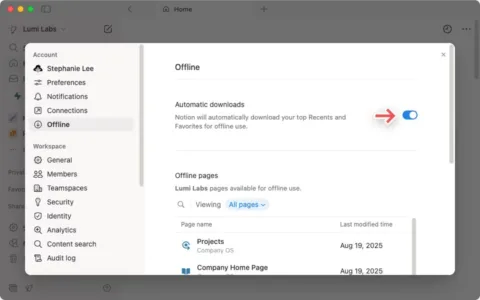
Subscribers of Notion’s Plus, Business, or Enterprise plans enjoy an added benefit: the app automatically downloads recently viewed and favorite pages. This reduces friction and ensures critical documents are always accessible. Users can manage downloads via a new “Offline” settings menu.
Technical Challenges Behind the Update
Ivan Zhao, Notion’s CEO, revealed that the delay stemmed from the app’s unique database design. Because Notion stores content as dynamic blocks, the team had to engineer a conflict resolution mechanism to handle edits from multiple users made offline. This technical breakthrough was necessary to deliver a reliable offline mode.
What This Means for Productivity Tools
The introduction of offline mode brings Notion closer to being a truly indispensable productivity tool, especially in comparison to alternatives like Evernote or Microsoft OneNote. It also highlights a broader trend: the demand for flexibility in workspaces that adapt to modern workstyles.
How Trenzest Helps You Stay Ahead
At Trenzest, we specialize in tracking and analyzing such tech developments to help businesses, creators, and entrepreneurs leverage them effectively. Whether it’s integrating Notion’s new offline features into your workflow or exploring complementary tools, Trenzest ensures you remain future-ready.
We provide actionable insights, trend analyses, and strategy recommendations to maximize efficiency in a rapidly evolving digital landscape. Learn more about how we can help on our resources page.
Final Thoughts & Next Steps
Notion’s offline mode is more than just a feature update—it’s a transformative shift in how users engage with one of today’s most popular productivity platforms. For professionals and teams, this means fewer disruptions and more control over their workflow.
To stay ahead of such innovations and harness them effectively, explore how Trenzest can support your journey toward smarter digital productivity. Visit Trenzest to learn more.