Introduction
Apple continues to enhance the resilience and functionality of its devices with the rollout of iOS 18.5. This latest software update brings a game-changing feature to older iPhones—satellite-based emergency communication, now extended to iPhone 13 users for the first time. Alongside this headline feature, Apple has also rolled out useful upgrades in parental controls, native apps, and system stability.
Whether you’re a tech enthusiast, digital entrepreneur, or marketer managing Apple devices, this update offers practical improvements that go beyond surface-level aesthetics. Let’s explore what iOS 18.5 brings to the table.
Emergency Satellite Services Expanded to iPhone 13
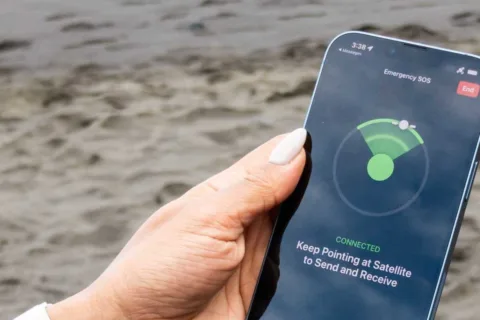
The most impactful change in iOS 18.5 is the extension of emergency satellite communication to the iPhone 13 lineup. Previously, this life-saving technology was exclusive to iPhone 14 and newer models.
This expansion democratizes access to critical emergency features, allowing more users to contact first responders in areas without cellular or Wi-Fi connectivity. Whether you’re lost in a remote area, caught in a natural disaster, or assisting someone in distress, the satellite SOS feature can be a lifesaver.
How the Emergency Satellite System Works
Apple’s emergency satellite system enables your iPhone to:
Send text messages to emergency services via satellite
Share your location with emergency contacts
Request roadside assistance
Use the system even when offline and out of network range
To enable this feature, go to Settings > Cellular on your iPhone and check for satellite service availability. The feature uses carriers like T-Mobile, which is partnering with Starlink to power parts of the connectivity.
This function has already been credited with saving lives—from rescuing stranded hikers to assisting wildfire victims, making it more than just a tech novelty.
Smarter Screen Time Controls for Parents
Parental controls receive a thoughtful enhancement with Screen Time updates in iOS 18.5. Now, parents are alerted if their child successfully guesses or inputs the Screen Time passcode—a major concern for many tech-savvy kids and their digitally aware guardians.
This proactive notification system ensures that parental limits remain effective and aren’t quietly bypassed, helping families enforce healthier digital habits.
New Features in Apple’s Native Apps
Mail App Improvements
The Mail app now has a dedicated “All Mail” tab, making it easier for users to access every message without switching between multiple folders. This is especially helpful for professionals and entrepreneurs who handle diverse inboxes.
Apple TV Subscription Enhancements
Apple has made it simpler to subscribe to Apple TV+ content from a smart TV or connected device, eliminating unnecessary friction in the user journey.
Pride-Themed Customization
A new Pride-themed wallpaper is available as part of Apple’s continued support for diversity and inclusion, aligning with ongoing social movements and brand values.
Bug Fixes and System Improvements
As with most iOS updates, iOS 18.5 includes essential bug fixes:
Resolved an issue where the Apple Vision Pro app launched with a black screen
Fixed problems with Siri, enterprise app compatibility, and other backend system bugs
These fixes contribute to a smoother, more reliable user experience across Apple devices.
Cross-Platform Updates: iPadOS, watchOS, macOS, and visionOS
In tandem with iOS 18.5, Apple released updates across its ecosystem:
iPadOS 18.5: Primarily focused on bug fixes
watchOS 11.5: Performance improvements and minor updates
visionOS 2.5: Enhancements to Vision Pro functionality
macOS Ventura 13.7.6 and macOS Sonoma 14.7.6: Security patches and system stability updates
These updates show Apple’s commitment to a unified, seamless experience for users who rely on multiple Apple products.
How These Updates Reflect Apple’s Ecosystem Strategy
Apple’s update strategy continues to reinforce its tight-knit ecosystem. By enhancing both new and older devices with forward-thinking features like satellite communication, Apple is not just supporting innovation—it’s also promoting longevity and inclusivity.
This approach benefits:
Tech enthusiasts, who value access to the latest features
Marketers, who rely on Apple platforms for seamless content delivery
Entrepreneurs, who manage business on-the-go and need dependable tools
Why This Matters to Tech Users and Entrepreneurs
In an increasingly connected world, the ability to stay safe, informed, and productive is essential. Updates like iOS 18.5 aren’t just about bells and whistles—they’re about delivering real-world utility.
Conclusion
Apple’s iOS 18.5 brings more than just minor updates—it introduces meaningful enhancements that improve safety, control, and usability across devices. By expanding satellite communication to iPhone 13 users and refining core apps and parental features, Apple continues to set the bar for mobile operating systems.
Stay informed, stay equipped, and keep exploring smarter ways to work and live—because in the digital age, updates like these aren’t optional—they’re essential.