Introduction: The Budget GPU Dilemma
As we move into 2025, finding a high-performing graphics card without spending over $1,000 can feel like chasing a unicorn. With newer models like the Nvidia RTX 50 Series and AMD 7000 Series either hard to find or heavily marked up, budget-conscious gamers and creators are turning to previous-generation GPUs for relief.
However, not all older cards are worth your money. If you’re targeting 1080p gaming or casual content creation, certain GPUs still provide solid value—if you know where to look.
Why Previous-Generation Cards Still Matter
While it’s tempting to chase the latest tech, the reality is that for many users—especially those gaming at 1,920 x 1,080 resolution or working on less demanding projects—previous-generation cards can provide exceptional value.
The challenge? Retail availability is dwindling, and prices fluctuate as stock dries up. Still, there are a few models from AMD and Nvidia that consistently pop up under $400, and they deliver solid frame rates in popular titles like Rocket League, Minecraft, and even Cyberpunk 2077 (with settings dialed down).
Top Picks Under $400
Nvidia: RTX 4060 Ventus 2X Black
One of the more consistently available options from Nvidia is the MSI GeForce RTX 4060 Ventus 2X Black. Compact, power-efficient, and backed by MSI’s reliable design, this card remains a popular choice for budget builds.
Performance: Optimized for 1080p, playable at 1440p with reduced settings
Pros: DLSS 3 support, energy-efficient, fits most PC cases
Cons: Struggles with newer AAA titles at high settings
Tip: When shopping under $500, even a $50–$100 difference matters. Look out for seasonal discounts on cards like these via platforms like Newegg or B&H Photo.
AMD: RX 7600 from Sapphire
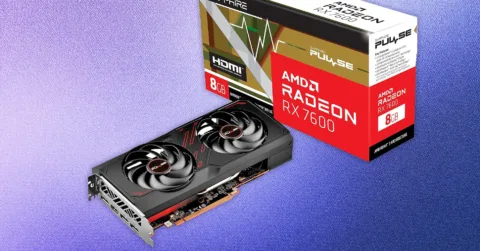
If you’re willing to venture outside Nvidia’s ecosystem, the AMD RX 7600, particularly from vendors like Sapphire, is a smart alternative. While it might not boast DLSS, it delivers reliable performance at 1080p and is often priced more competitively.
Performance: Great for older titles and indie games
Pros: Lower price, solid frame rates, AMD FidelityFX Super Resolution (FSR)
Cons: Not ideal for 1440p, lacks some modern features
Historically, Sapphire’s build quality has been impressive. If you’re looking to stretch your dollar without compromising on reliability, the RX 7600 is a strong candidate.
What to Know Before Buying a Used GPU
While buying used hardware can be tempting—especially with GPUs—it’s a route filled with potential pitfalls. Unlike CPUs or RAM, GPUs can suffer from prior abuse (e.g., crypto mining, overheating, or poor maintenance).
Safety Tips When Buying Used:
Inspect Physically: Look for damaged PCIe pins, corrosion, or broken fans.
Request Proof: Ask for a video showing the card running a game with the serial number visible.
Test Immediately: Use GPU-Z to verify specifications and run stress tests as soon as possible.
Reddit hardware swap forums and local marketplaces like Craigslist can offer deals, but due diligence is crucial. If you’re unsure, prioritize platforms with strong buyer protection such as eBay or Facebook Marketplace (with secure payments).
Trenzest’s Take: Strategic Hardware Upgrades
At Trenzest, we always recommend aligning your hardware purchases with your goals. Whether you’re a freelancer editing videos or a business owner dabbling in AI automation, not every task requires a top-tier GPU.
Instead of chasing specs, focus on smart upgrades that deliver real productivity boosts. For example:
Gamers can get by with budget cards until the next gen drops.
Content creators editing 1080p footage may benefit more from extra RAM or a faster SSD.
Entrepreneurs building lean digital workstations should prioritize balance, not just GPU muscle.
Final Thoughts: Smart Spending for Performance
In a landscape dominated by sky-high GPU prices and constant generational shifts, staying grounded is key. While the RTX 4060 and RX 7600 may not win benchmark contests, they offer reliable, practical performance for most users at an affordable price.
Avoid panic-buying the latest hardware. Instead, watch the market, weigh your real needs, and make the most of your investment.
Ready to upgrade without breaking the bank?
Browse our top recommendations and in-depth tech insights on Trenzest.com, your go-to hub for tech tips, growth tools, and smarter decisions.