Introduction: A Landmark Update for iPad Users
Apple has unveiled iPadOS 26, calling it “the biggest iPadOS release ever.” While that’s a bold claim, this update delivers substantial improvements that enhance productivity, creativity, and user experience. Whether you’re a student, a business professional, or a digital creator, iPadOS 26 promises to make your iPad more powerful and versatile than ever before.
Design Overhaul: Introducing Liquid Glass UI
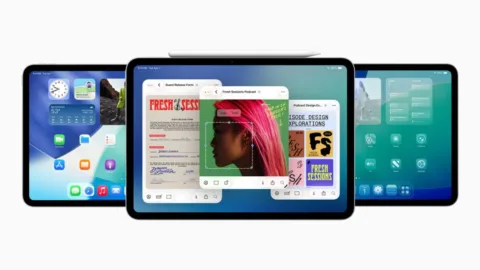
The first thing users will notice is the Liquid Glass design, a sleek and modern visual refresh that aligns with the aesthetics introduced in iOS 26 and macOS Tahoe. The interface feels more immersive and fluid, making multitasking and app switching more intuitive.
This design update isn’t just about looks. It’s about creating a unified experience across Apple devices—helping users transition between Mac, iPhone, and iPad more seamlessly.

Multitasking and Window Management Upgrades
One of the most anticipated changes is the new window system. iPadOS 26 finally gives users the ability to view and tile multiple windows side-by-side with ease. This is especially useful for professionals managing multiple documents or applications at once.
Even better, the update expands compatibility with Stage Manager, allowing users to organize their windows into customizable workflows, much like on macOS. These enhancements bring the iPad closer than ever to functioning as a full-fledged laptop replacement.
Enhanced File Handling with Preview and Files App
iPadOS 26 introduces a full-fledged version of the Preview app, enabling users to edit, annotate, and manage PDFs and images natively—just like on a Mac. The Files app also sees a significant upgrade, now allowing you to:
Drag and drop folders directly to the Dock
Set default apps for specific file types
Manage content more efficiently through advanced navigation tools
This brings true desktop-level file management to the iPad—a long-awaited improvement for power users.

Apple Intelligence: Smarter Features Across the OS
Apple is integrating its next-generation Apple Intelligence suite across devices, and iPadOS 26 is no exception. Key features include:
Live Translation: Real-time voice translations in Phone, FaceTime, and Messages, preserving the speaker’s voice tone
Context-aware suggestions: Smarter email replies, content generation, and reminders
These tools are designed to support seamless communication and productivity, whether you’re on a video call or composing a quick message.
Pro-Level Tools for Creators and Podcasters
For content creators, this update is particularly exciting. iPadOS 26 enables background rendering for computationally heavy tasks such as exporting videos from Final Cut Pro, allowing you to multitask without lag.
When it comes to audio and video recording, creators can now:
Choose custom audio/video inputs per app
Enable voice isolation for clearer sound
Use AirPods Pro 2 for near studio-quality recordings
The new Local Capture feature in video conferencing apps supports multi-track audio and video recording—making the iPad a viable alternative to platforms like Riverside.

Why iPadOS 26 Is a Game-Changer for Professionals
With a refined UI, powerful multitasking, smart AI integrations, and pro-level recording tools, iPadOS 26 bridges the gap between tablet and desktop computing. It’s an ideal platform for entrepreneurs, marketers, and digital creatives looking to streamline their workflows without sacrificing mobility.
How Trenzest Helps You Stay Ahead
At Trenzest, we help tech-savvy professionals and entrepreneurs stay on the cutting edge of digital transformation. From exploring the latest Apple ecosystem updates to implementing productivity tools and automation workflows, we deliver insights you can act on.
Conclusion and Next Steps
iPadOS 26 isn’t just an update—it’s a complete evolution of the iPad experience. With smarter tools, intuitive multitasking, and powerful features for creatives, it positions the iPad as a serious contender in professional computing.
Want to learn how to optimize your Apple setup for business or content creation? Connect with Trenzest and explore more strategies to work smarter, not harder.