
Introduction
In today’s digital economy, where online transactions dominate, having a secure and efficient payment system is essential for businesses of all sizes. PayPal, a global leader in online payments, provides a dedicated solution through its PayPal Business Account. This article explores its features, benefits, and the step-by-step process of setting up and optimizing a PayPal Business Account.
Understanding the PayPal Business Account
A PayPal Business Account is specifically designed to meet the needs of businesses, freelancers, and entrepreneurs. It offers a seamless and secure platform for receiving payments, managing finances, and conducting transactions both locally and internationally.
Key Features and Benefits
| Feature | Description |
|---|---|
| Payment Processing | Accept payments via multiple channels like online stores, invoices, and in-person transactions. Supports credit/debit cards, PayPal balance, and bank transfers. |
| International Transactions | Process payments in multiple currencies, allowing businesses to expand globally. Built-in currency conversion for simplified transactions. |
| Invoicing and Billing | Create and send professional invoices with customizable templates. Includes payment reminders and tracking features. |
| E-commerce Integration | Easily integrate with platforms like Shopify, WooCommerce, and Magento for seamless transactions. |
| Access to Working Capital | Eligible businesses can apply for PayPal’s working capital loans to fund growth, with flexible repayment options. |
How to Open a PayPal Account in India
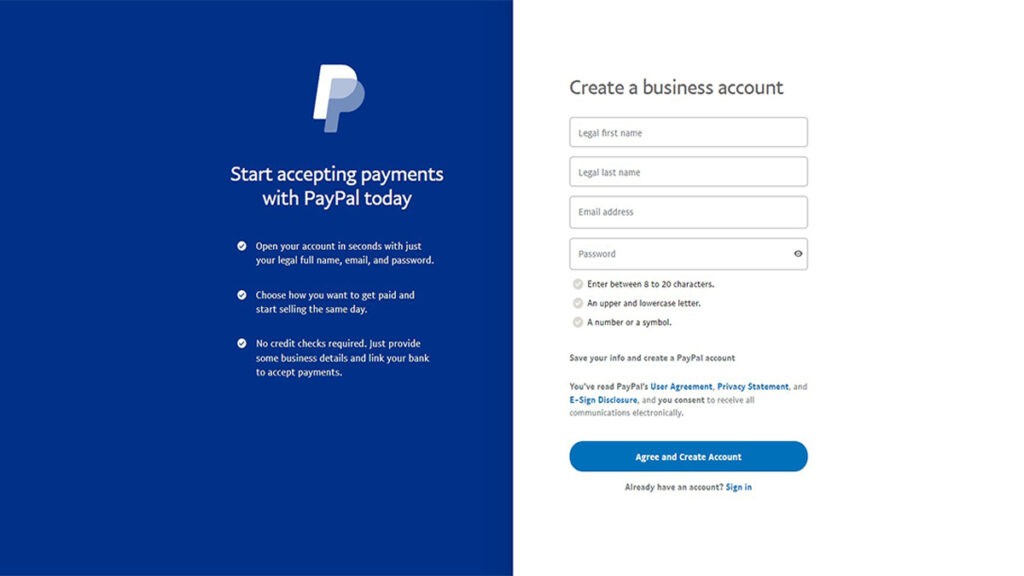
Setting up a PayPal Business Account in India is simple. Follow these steps:
- Visit the PayPal Website
Go to www.paypal.com. - Sign Up
Click on “Sign Up” and select “Business Account.” - Provide Business Information
Enter your email, business details, and contact information. - Link Your Bank Account
Add your bank account details for transactions. - Verify Your Email and Phone Number
Confirm your email via the verification link sent by PayPal. - Complete Identity Verification
Provide documents such as PAN card, Aadhaar card, or business registration documents if required. - Set Up Security Measures
Enable two-factor authentication for enhanced security.
Once these steps are completed, your PayPal Business Account is ready to send and receive payments. Always check PayPal’s official website for any updates or changes in policies.
Frequently Asked Questions
1. How do I create a PayPal account?
Visit the official PayPal website, click “Sign Up,” and follow the instructions to register and link your bank account.
2. Can I have multiple PayPal accounts?
Individuals are allowed one personal and one business account.
3. What is the difference between a Personal and a Business PayPal account?
A Personal account is for individual use, while a Business account provides additional features tailored for businesses and freelancers.
4. Is my financial information secure on PayPal?
Yes, PayPal employs advanced encryption and security measures to protect user data.
5. How do I report unauthorized activity?
Contact PayPal customer support immediately and change your password.
6. Is it safe to link my bank account or credit card to PayPal?
Yes, PayPal uses encryption technology to protect financial information.
7. How can I send money using PayPal?
Log in, click “Send & Request”, enter the recipient’s details, and specify the amount.
8. What fees does PayPal charge?
PayPal charges transaction fees, which vary depending on the type of transaction. Check the official fee structure for details.
9. Can I use PayPal for international transactions?
Yes, PayPal supports cross-border payments in multiple currencies.
10. How do I dispute a transaction?
Use the “Resolution Center” on your PayPal account to file disputes and report issues.
11. What if my purchase doesn’t arrive or is incorrect?
PayPal’s Buyer Protection program allows users to file disputes for refunds.
12. How do I contact PayPal customer support?
Visit the “Contact Us” section on the PayPal website for support options.
Conclusion
A PayPal Business Account is a powerful tool for businesses seeking seamless and secure online payment solutions. With its versatile features, global reach, and financial management capabilities, businesses can optimize their payment processes and focus on growth. By leveraging PayPal’s benefits, entrepreneurs can stay ahead in the competitive digital landscape.
For more insights and business solutions, visit Trenzest.