1. Introduction
Apple has once again captured attention with the release of its sixth developer beta of iOS 26, alongside updates for iPadOS, watchOS, tvOS, macOS, and more. With the official September launch fast approaching, Beta 6 focuses less on groundbreaking features and more on refined details, usability enhancements, and subtle design changes. Yet, even these “smaller” updates reveal Apple’s ongoing commitment to delivering polished, user-friendly experiences.
2. Overview of iOS 26 Beta 6 Release
While earlier iOS 26 betas introduced significant overhauls, Beta 6 is primarily about fine-tuning user experience. This update includes:
A fresh set of ringtones
A resolution to the Camera app swipe direction debate
Faster, smoother app animations
Refinements to the Liquid Glass user interface
A redesigned onboarding process
These changes, though modest in isolation, combine to make iOS 26 feel more cohesive and responsive.
3. New Features and Enhancements
3.1 Fresh Ringtones for a Personalized Experience
In a move that caught many by surprise, Apple has added six new ringtones, all variations of the iconic “Reflection” tone. Early testers have praised “Dreamer” in particular, calling it “a bop” and “crazy good” on social media. This refresh may even tempt long-time silent mode users to leave their phones audible for a change.
3.2 The Camera App Swipe Direction Controversy
One of the more heated topics among testers has been the Camera app’s mode switcher. Previous betas reversed the familiar swipe direction, breaking years of user muscle memory.
Apple initially added a toggle in Beta 5 to switch between “Classic Mode” and the new direction. However, Beta 6 removes the toggle entirely and restores the original swipe behavior—effectively conceding to user feedback.
This decision mirrors Apple’s history of offering user-choice in UI changes, such as allowing Safari’s address bar relocation or disabling natural scrolling on macOS.
3.3 Enhanced App Animations and Transitions
Speed and fluidity are central to the Beta 6 experience.
App open/close animations now borrow from iPadOS, with a subtle “magic lamp” effect.
Transitions are notably faster, creating a snappier interface.
These refinements, while small, enhance perceived device performance.
3.4 Liquid Glass UI Refinements
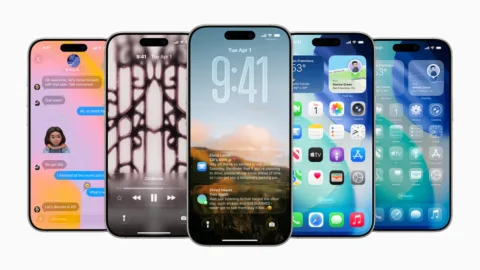
The Liquid Glass interface—a translucent, color-dispersing design element—is evolving. In Beta 6, there’s improved color dispersion when switching between app tabs, updated lock screen visuals, and more refined toggle effects. These tweaks give iOS 26 a modern yet functional aesthetic, balancing style and readability.
4. Onboarding Experience for New Users
Apple has revamped its startup and onboarding sequence, introducing users to:
Liquid Glass UI
Redesigned icons (dark and clear modes)
Updated layouts for core apps
This smoother onboarding flow helps first-time users and upgraders quickly adapt to the latest features.
5. Stability and Performance Improvements
While beta software often comes with instability, Beta 6 feels noticeably faster and more reliable than its predecessors.
Reduced bugs from previous versions
Improved responsiveness
Early signs that Apple is entering the final pre-launch optimization phase
Public beta testers should expect a corresponding update soon.
6. Implications for Developers, Marketers, and Businesses
These refinements are more than cosmetic. They:
Impact app design choices, especially for developers leveraging iOS-native animations.
Influence marketing campaigns, where visuals and micro-interactions can affect brand perception.
Open opportunities for creative engagement, such as branded ringtones or custom onboarding flows within apps.
7. How Trenzest Can Help You Stay Ahead
At Trenzest, we specialize in helping businesses adapt quickly to evolving digital ecosystems. Whether you’re a developer preparing your app for iOS 26, a marketer seeking to capitalize on Apple’s new UI elements, or an entrepreneur building a mobile-first brand, our team ensures your strategy stays ahead of the curve.
From UI/UX optimization to SEO-driven content strategies, Trenzest provides actionable, data-backed insights that turn technology updates into business opportunities.
8. Conclusion
iOS 26 Beta 6 might not bring sweeping changes, but its user experience refinements, UI polish, and restored familiar gestures reflect Apple’s responsiveness to its community. As the September launch nears, these updates pave the way for a smoother, more engaging operating system.
To keep pace with such fast-moving developments, leveraging expert guidance from Trenzest can be the difference between adapting—and leading—in a competitive market.